> ## Documentation Index
> Fetch the complete documentation index at: https://docs.facture.ar/llms.txt
> Use this file to discover all available pages before exploring further.
# Configuración de CUIT por Delegación
> Guía completa para configurar tu CUIT usando delegación
# 🤝 Guía para la delegación del CUIT
**Diste de alta un CUIT, y llegaste hasta acá.**
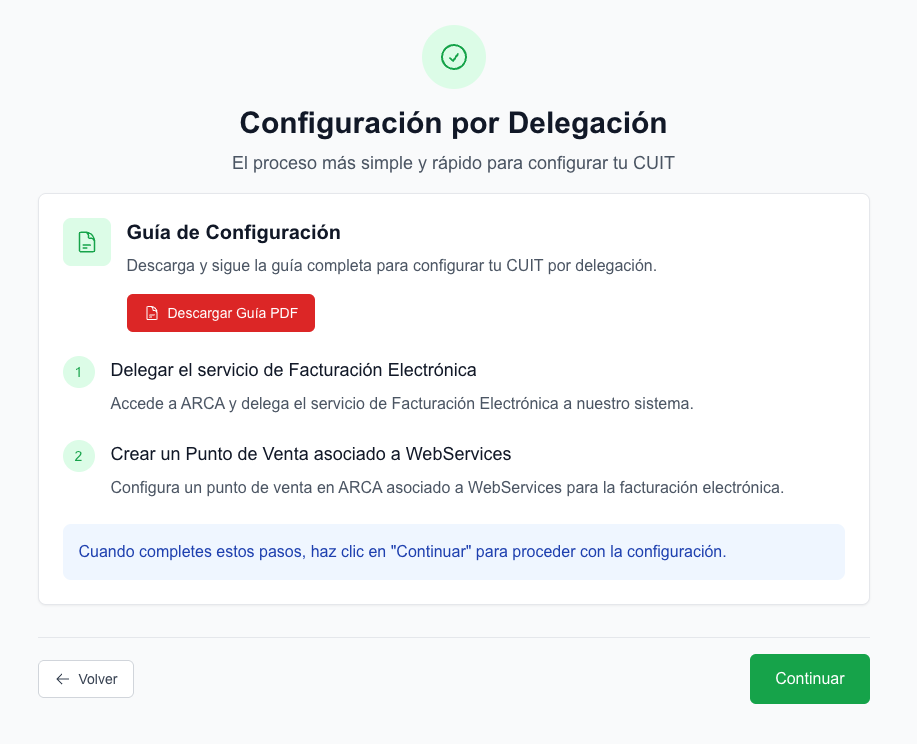 Ahora vamos a hacer dos cosas:
* Delegar los web services de Factura electronica
* Dar de alta un punto de venta
### Paso 1: Delegar los web services de Factura electronica
Para comenzar a facturar electrónicamente, es necesario que le indiques a ARCA que vas a utilizar [FACTURE.AR](http://FACTURE.AR) como software de facturación. ¡Te mostramos cómo hacerlo!
Ingresá a la sección [**Acceso con Clave Fiscal**](https://auth.afip.gob.ar/contribuyente_/login.xhtml) de la web de ARCA. Escribí el **CUIT** de tu empresa y luego tu Clave Fiscal. El único requisito es contar con **Clave Fiscal nivel 3**.
Ingresá a **Mis Servicios** y luego al **Administrador de Relaciones de Clave Fiscal**.
Ahora vamos a hacer dos cosas:
* Delegar los web services de Factura electronica
* Dar de alta un punto de venta
### Paso 1: Delegar los web services de Factura electronica
Para comenzar a facturar electrónicamente, es necesario que le indiques a ARCA que vas a utilizar [FACTURE.AR](http://FACTURE.AR) como software de facturación. ¡Te mostramos cómo hacerlo!
Ingresá a la sección [**Acceso con Clave Fiscal**](https://auth.afip.gob.ar/contribuyente_/login.xhtml) de la web de ARCA. Escribí el **CUIT** de tu empresa y luego tu Clave Fiscal. El único requisito es contar con **Clave Fiscal nivel 3**.
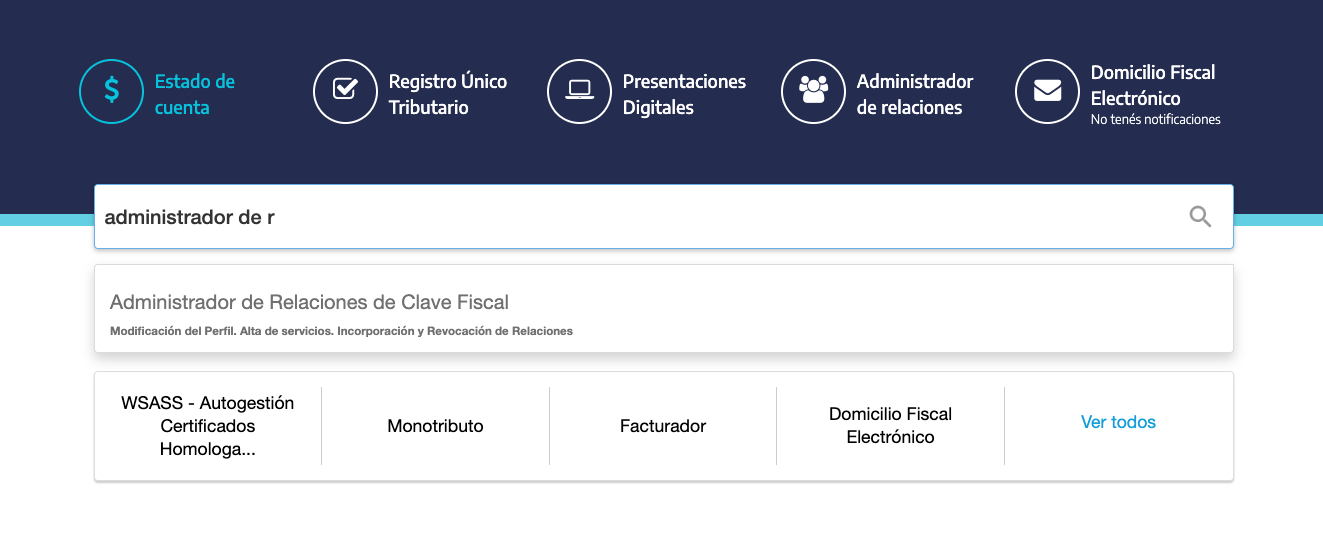
Ingresá a **Mis Servicios** y luego al **Administrador de Relaciones de Clave Fiscal**.
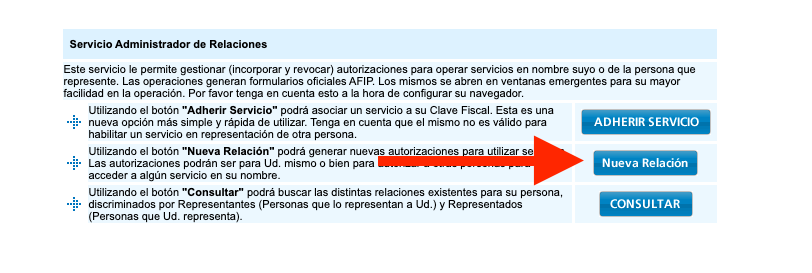
 Hacé clic en **Nueva Relación**.
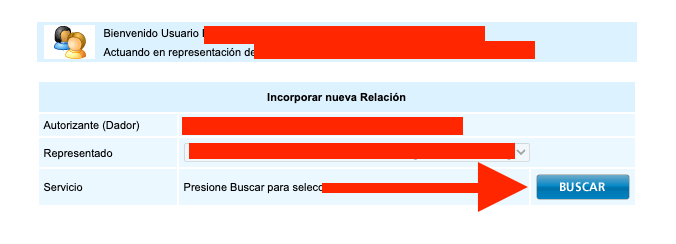
 Hace clic en buscar
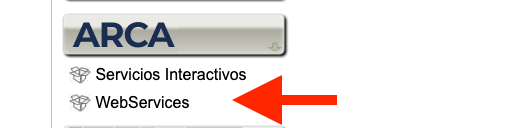
 Hacé clic en el **botón ARCA** y luego en **WebServices**.
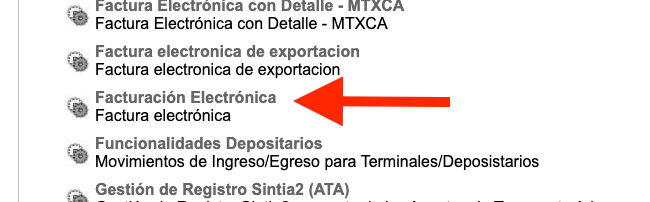
 Buscá **Facturación Electrónica**.
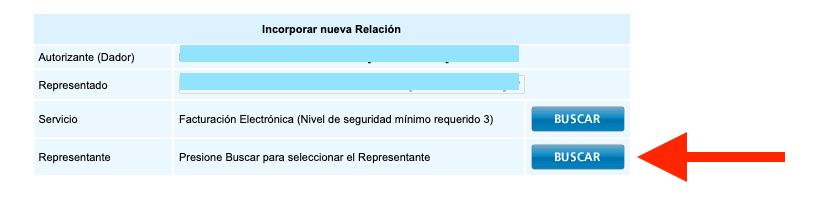
 Click en buscar
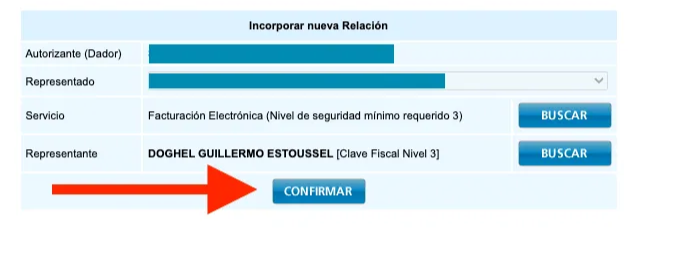
 En **CUIT**, **20337746285**, presioná **Buscar** y confirmar.
Si te aparece un mensaje en rojo; desestimalo. ARCA te avisa que no tenes un facturador registrado, de eso nos encargamos nosotros!
En **CUIT**, **20337746285**, presioná **Buscar** y confirmar.
Si te aparece un mensaje en rojo; desestimalo. ARCA te avisa que no tenes un facturador registrado, de eso nos encargamos nosotros!
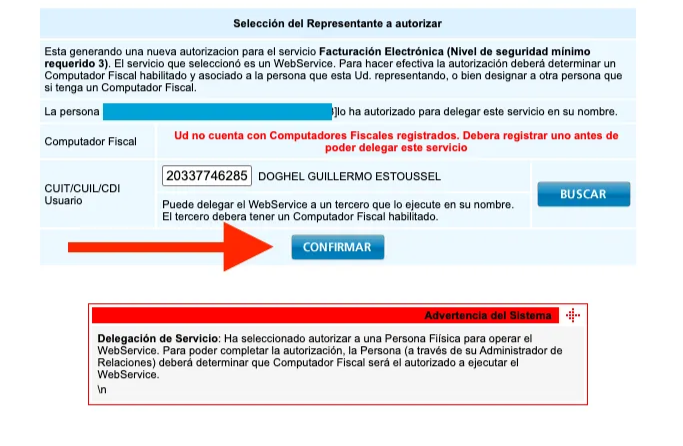 y luego **Confirmar**.
 ### Paso 2: Dar de alta un punto de venta
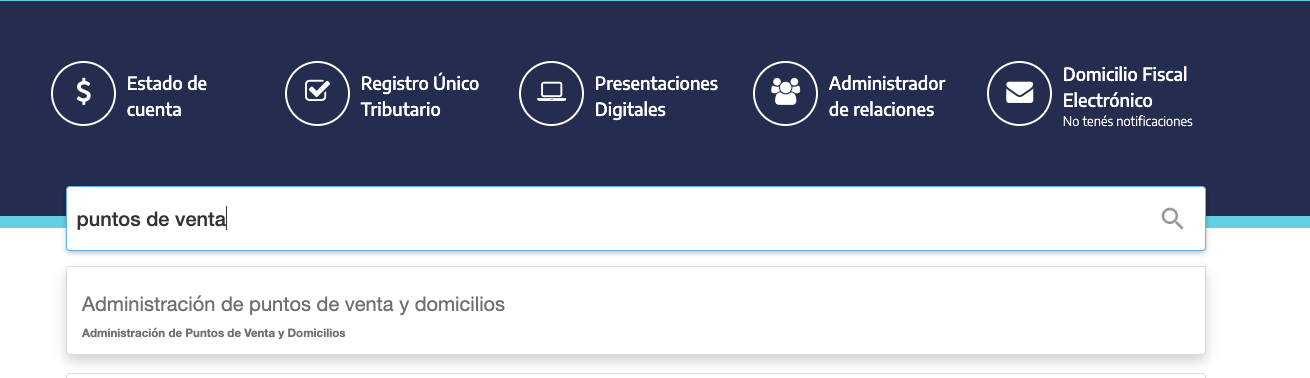
En la pagtina de ARCA, busca puntos de venta
### Paso 2: Dar de alta un punto de venta
En la pagtina de ARCA, busca puntos de venta
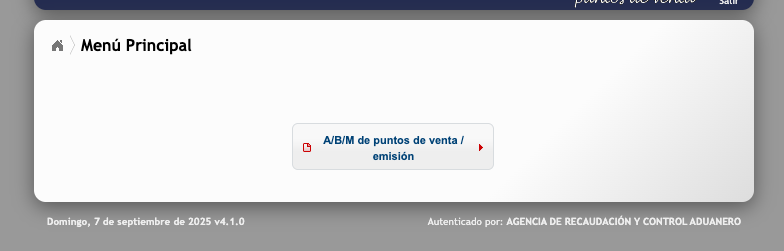
 Hacé clic en el **nombre de tu empresa y** seleccioná **A/B/M de puntos de venta**.
 Seleccioná "Agregar"
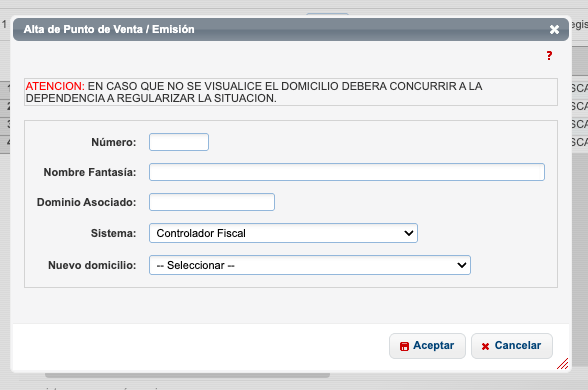 Completá el **Código del punto de venta** (verificá que siempre sean 5 dígitos, por ejemplo: "00003"), Nombre de Fantasía, y luego seleccioná el sistema de facturación según corresponda.
**Número de punto de venta:** tiene que ser distinto a los que ya hayas creado.
**Nombre de fantasía de tu empresa:** podés escribir el que quieras porque solo será visible para ARCA, incluso podés escribir [FACTURE.AR](http://FACTURE.AR).
**Dominio asociado:** podés dejarlo sin completar o escribir el dominio de tu negocio, por ejemplo, [milocal.com.ar](http://milocal.com.ar).
**Sistema:** tenés que elegir una opción dependiendo de cuál sea tu condición tributaria:
* Si sos MONOTRIBUTISTA elegí Factura Electrónica – Monotributo - WebServices
* Si sos RESPONSABLE INSCRIPTO elegí RECE para aplicativo y WebServices
* Si sos IVA EXENTO elegí Facturación Electrónica - exento en IVA - WebServices
**Domicilio:** Seleccioná el que corresponda al punto de venta.
Presioná **Aceptar** y selecciona "**Sí"** para finalizar.
Completá el **Código del punto de venta** (verificá que siempre sean 5 dígitos, por ejemplo: "00003"), Nombre de Fantasía, y luego seleccioná el sistema de facturación según corresponda.
**Número de punto de venta:** tiene que ser distinto a los que ya hayas creado.
**Nombre de fantasía de tu empresa:** podés escribir el que quieras porque solo será visible para ARCA, incluso podés escribir [FACTURE.AR](http://FACTURE.AR).
**Dominio asociado:** podés dejarlo sin completar o escribir el dominio de tu negocio, por ejemplo, [milocal.com.ar](http://milocal.com.ar).
**Sistema:** tenés que elegir una opción dependiendo de cuál sea tu condición tributaria:
* Si sos MONOTRIBUTISTA elegí Factura Electrónica – Monotributo - WebServices
* Si sos RESPONSABLE INSCRIPTO elegí RECE para aplicativo y WebServices
* Si sos IVA EXENTO elegí Facturación Electrónica - exento en IVA - WebServices
**Domicilio:** Seleccioná el que corresponda al punto de venta.
Presioná **Aceptar** y selecciona "**Sí"** para finalizar.
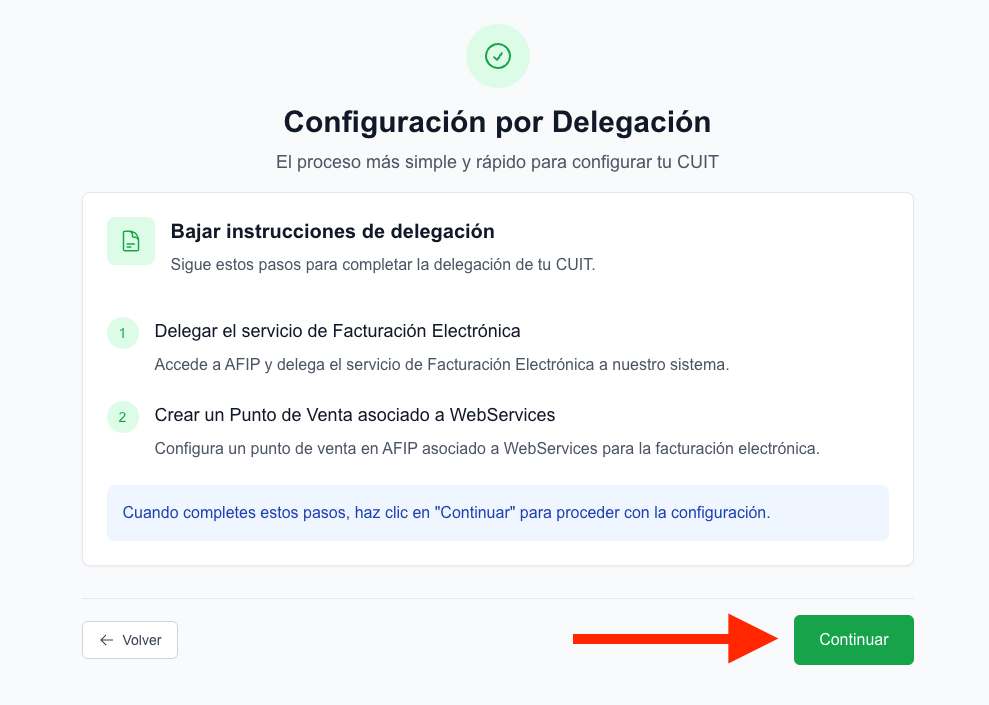
.png?fit=max&auto=format&n=rTGFhGrk6JMjiyvf&q=85&s=9d6e80f173ea1298703fce235ff9d9d0) Ahora volve a [FACTURE.AR](http://FACTURE.AR) y hace clic en continuar asi nos llega el aviso de que ya complestaste estos pasos en ARCA.
Ahora volve a [FACTURE.AR](http://FACTURE.AR) y hace clic en continuar asi nos llega el aviso de que ya complestaste estos pasos en ARCA.
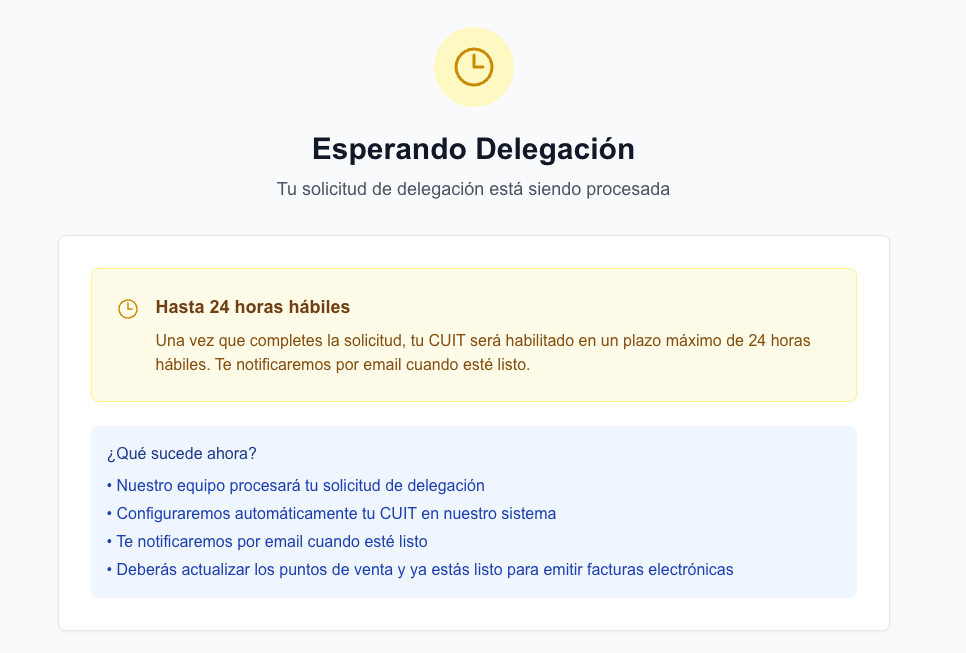
 🎉 Listo, en 24 horas vamos a estar aprobando tu solicitud para que puedas empezar a usar [FACTURE.AR](http://FACTURE.AR).
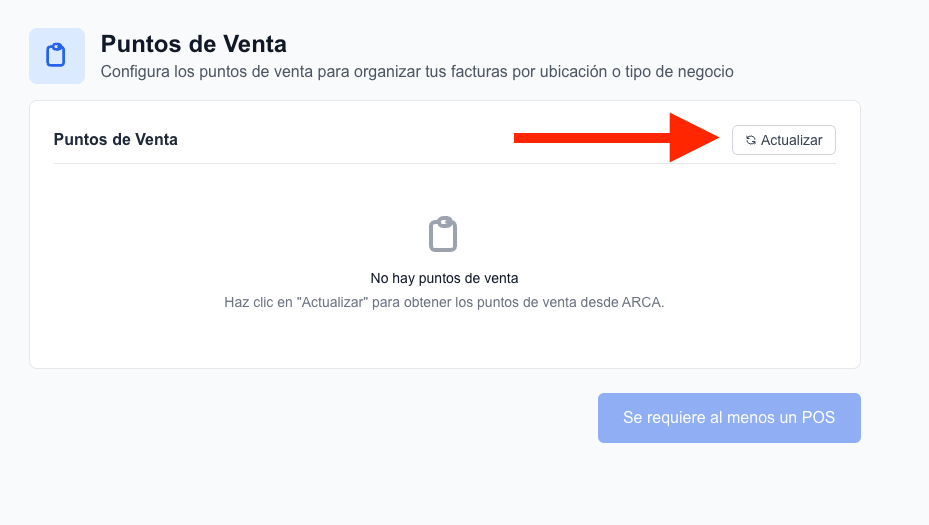
 Te vamos a enviar un email avisandote de esto. Cuando vuelvas, vas a ver esta pantalla. Hace clic en Actualizar. Si esta todo bien, vas a ver tu punto de venta. y vas a poder finalizar este tutorial.
 ## 🎉 Listo! Ya tenes tu CUIT configurado para usar FACTUREAR!
***
Ir al dashboard de Facturear y empezar a emitir facturas con tu CUIT ya configurado.
## 🎉 Listo! Ya tenes tu CUIT configurado para usar FACTUREAR!
***
Ir al dashboard de Facturear y empezar a emitir facturas con tu CUIT ya configurado.